How to solve the problem of PIX6, PIXHAWK, CrossRace Pro, CrossRace, CrossFlight-CE, CrossFlight, and Mini Pix flight controllers not unlocking?
1. Flight controller fault or incomplete calibration
Check error alerts in the Flight Data tab of the ground station. The system will report corresponding faults if the accelerometer or magnetometer is uncalibrated.
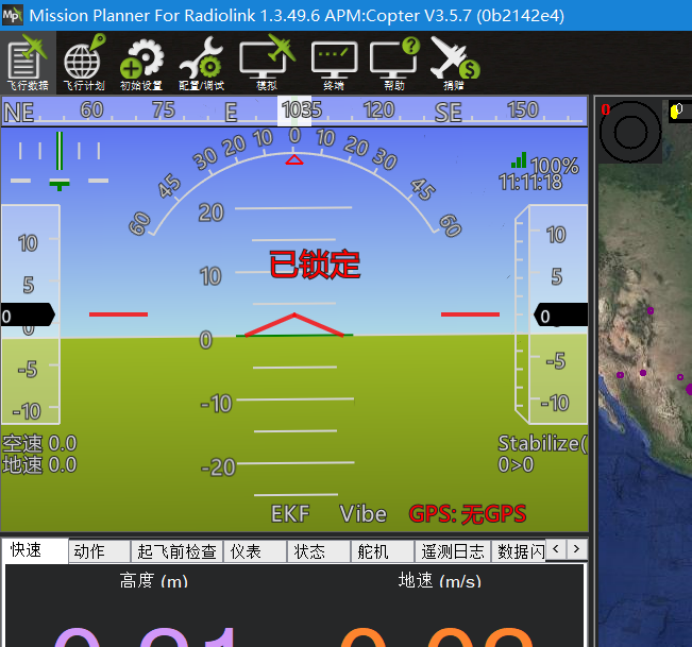
2. Incorrect channel reversal settings
The flight controller will check throttle and rudder channels upon arming. The throttle must be at its minimum travel, and the rudder at its maximum right travel. For RadioLink AT9S Pro, AT9S, AT9, AT10II and AT10 transmitters, set Channel 3 (throttle) to reversed phase and the rudder to normal phase.
3. Attempting to arm position hold modes indoors without GPS
Position hold, loiter and other position-dependent flight modes require valid GPS lock before arming. When flying indoors with no GPS signal, use attitude stabilize, altitude hold or other non-positioning modes for arming.
4. Safety switch not activated on the aircraft
You may enable or disable the safety switch function. If it is enabled, press the safety switch first before arming via the transmitter. Arm the aircraft only after the indicator light changes from flashing to steady on.
5. Mismatched flight modes between transmitter and flight controller
Flight modes are generally assigned to a specific channel, such as Channel 5. Different PWM values of this channel correspond to different flight modes, which are selected via a 3-position switch or a combination of a 2-position switch and a 3-position switch.
For example, when the channel output reads 1230, the transmitter shows Stabilize mode, while the flight controller recognizes Position Hold mode. In this case, the flight controller will receive a Position Hold command even if you select Stabilize on the transmitter, and arming will fail indoors without GPS.
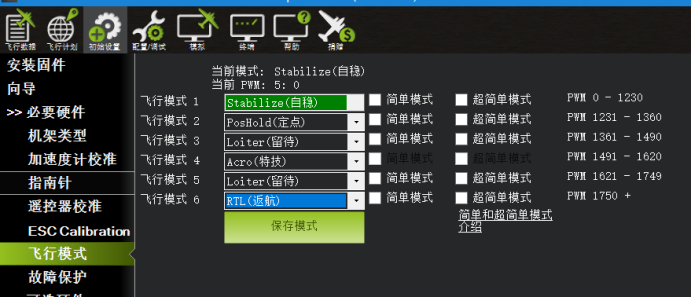
6. Uncalibrated transmitter sticks
Arming requires the throttle stick to be at the lowest position and the rudder stick fully to the right.
Take the rudder channel as an example: its default maximum right output is 1900. If the actual maximum value is only 1800 due to poor calibration, arming will not work.
Complete transmitter stick calibration via the ground station, so the flight controller recognizes 1800 as the full right limit of the rudder stick. Arming will be available once the stick reaches this position.
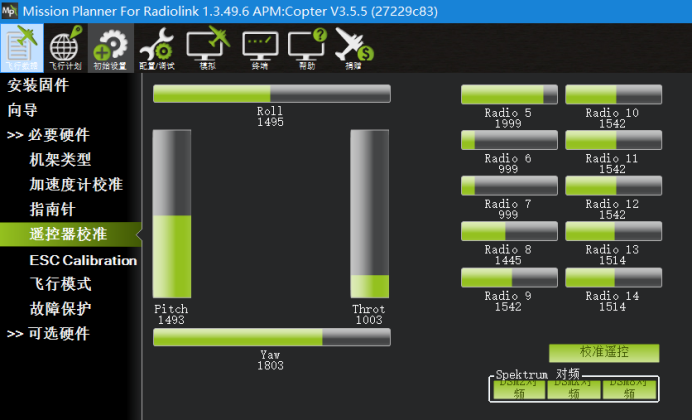
7. ESC Not Calibrated
- After arming, if you hear the motor beeping rapidly, the ESC is uncalibrated. Please refer to your flight controller’s manual for ESC calibration steps.
- All RadioLink flight controller manuals are available at: https://radiolink.com/manuals_download